전체 아키텍처에서 현재 위치
⚙️코어 엔진
→🔧도구 시스템
→🛡️보안
→🧠컨텍스트
→🤝멀티 에이전트
→🌐생태계
→⚡인프라
1
훅 타입과 이벤트
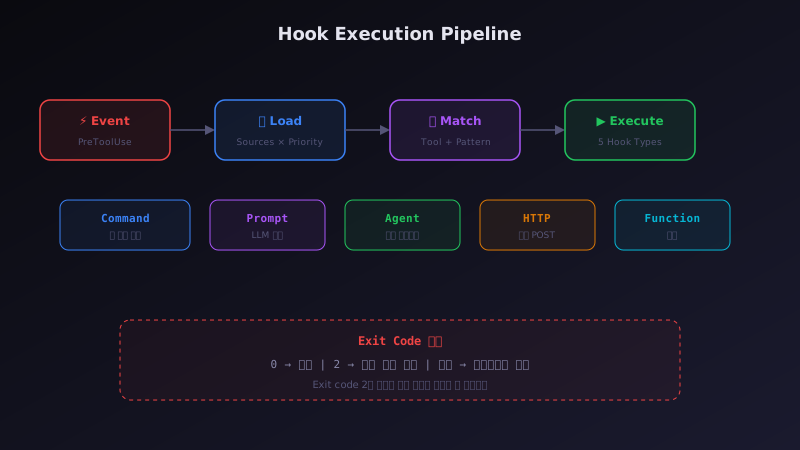
5가지 훅 타입과 실행 파이프라인
훅 타입이벤트매처실행 엔진|
utils/hooks/hooksConfigManager.tsutils/hooks/sessionHooks.ts훅 시스템은 5가지 훅 타입과 5가지 이벤트로 도구 실행을 확장합니다.
src/utils/hooks/hooksConfigManager.ts
1// src/utils/hooks/hooksConfigManager.ts — 훅 이벤트 메타데이터2 3const hookEventMetadata = {4 PreToolUse: {5 summary: 'Before tool execution',6 description: `Input: JSON of tool call arguments.7Exit 0 → stdout/stderr not shown8Exit 2 → show stderr to model and BLOCK tool call💡9Other → show stderr to user only, continue`,10 matcherMetadata: {11 fieldToMatch: 'tool_name',12 values: toolNames, // 도구 이름 목록으로 매칭13 },14 },15 PostToolUse: {16 summary: 'After tool execution',17 description: `Input: JSON with "inputs" and "response".18Exit 0 → stdout shown in transcript mode19Exit 2 → show stderr to model immediately20Other → show stderr to user only`,21 },22 PostToolUseFailure: {23 summary: 'After tool execution fails',24 description: 'Input: JSON with error details',25 },💡26 PermissionDenied: {27 summary: 'After auto mode classifier denies',28 description: 'Return {"retry":true} to allow retry',29 },30 Notification: {31 summary: 'When notification is sent',32 },33}34 35// ─── 5가지 훅 타입 ───💡36// Command → 셸 명령 실행 (가장 일반적)37// Prompt → LLM 쿼리 (모델 기반 결정)38// Agent → 포크된 하위 에이전트 (복잡 로직)39// HTTP → 웹훅 POST (SSRF 가드 적용)40// Function → 세션 전용 콜백 (SDK/프로그래밍)41 42// 설정 예시 (settings.json):43// "hooks": {44// "PreToolUse": [{45// "matcher": "Bash(git *)",46// "command": "echo 'Git command detected'"47// }]48// }⟩
훅 실행 파이프라인
이벤트 발생
PreToolUse, PostToolUse 등
소스 로드
Policy → User → Project → Plugin → Session
매처 필터
이벤트 + 도구 이름 패턴 매칭
실행
Command/Prompt/Agent/HTTP/Function
결과 집계
성공/차단/오류 판정
?
이해도 확인 퀴즈
PreToolUse 훅에서 exit code 2를 반환하면 어떤 일이 일어나나요?
✅ 학습 체크리스트
이해한 항목을 체크하고 학습 진도를 확인하세요
0/4 완료0%
📋 생태계 파트 요약
이 챕터에서 배운 핵심 개념을 정리합니다
1
플러그인 시스템
마켓플레이스 기반 배포, 매니페스트 검증, 블랙리스트 보안을 포함한 46개 모듈 시스템입니다.
2
MCP 통합
4가지 전송 계층을 추상화하여 다양한 MCP 서버와 통신하며, 내장 도구와 이름 충돌 시 내장 도구가 우선합니다.
3
훅 시스템
PreToolUse/PostToolUse 이벤트에 5가지 타입의 훅을 연결하여 도구 실행을 제어할 수 있습니다.
다음 챕터 미리보기: 다음은 터미널 UI 엔진, 설정 시스템, 원격 실행 브릿지 등 '인프라' 파트입니다.